
Replacing Valo Intranet is a topical issue for many organizations, as the end of its development has prompted companies to migrate to SharePoint intranet. SharePoint offers a modern and flexible solution that supports organizational growth.

Valo Intranet has entered the maintenance phase, which means that its active development has ended and is now focused on maintenance. This change has prompted many organizations to look for alternatives that offer more modern and advanced intranet solutions. SharePoint intranet is one of the most popular options, offering flexible and versatile features.
Valo runs on top of SharePoint and uses its structures and features, but the Valo intranet is designed as a “ready-to-use” solution, meaning it includes several pre-built features and ready-made themes. This has reduced the intranet construction time and accelerated deployment.
Replacing the Valo intranet with SharePoint – how to make the transition
Our customer decided to replace the old Valo Intranet with the standard features of SharePoint to offer their employees an up-to-date and secure intranet solution. The goal of the change process was to make the transition as seamless and user-friendly as possible.
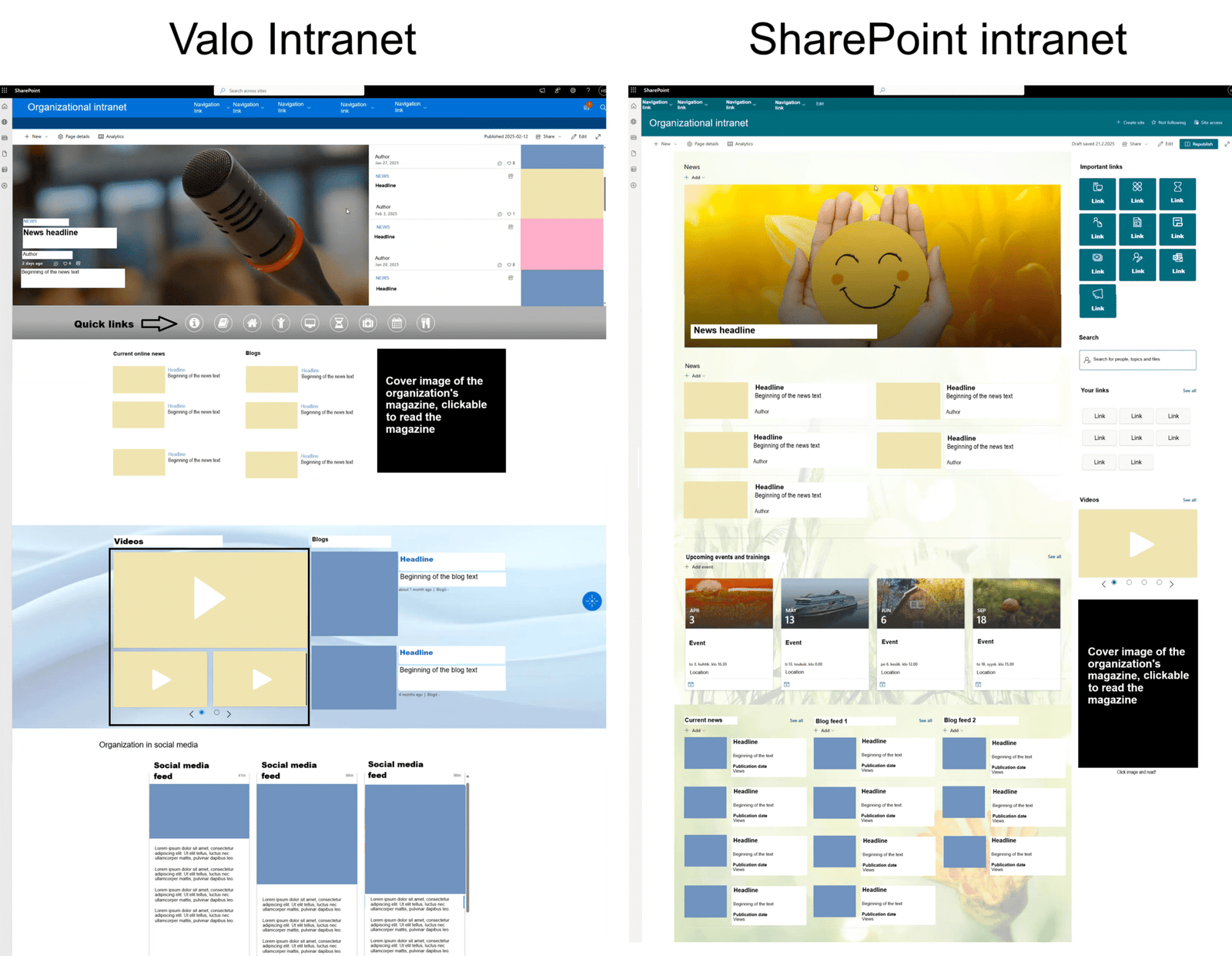
In this case, the change concerned slightly redesigning the user interface and visuals. If the intranet concept and content are to be kept the same, the easiest and fastest way to replace Valo Intranet with SharePoint is to create a new home page and navigation.
The home page was made very similar in structure and visual features to its previous state, which made it easier for users to adapt to the change.
The navigation was also built similarly, utilizing SharePoint’s standard features. The links in the new intranet’s navigation direct to the pages of the old intranet, making it quick and easy to find the same content as before.
After the front page and navigation were redesigned, the Valo application was removed from all intranet pages and connected to the central SharePoint site.
The new SharePoint-based intranet offers many of the same benefits as the Valo Intranet but on a modern and evolving platform. The project carried out with our client succeeded in ensuring that the intranet remained smooth to use.
Advantages and similar features of SharePoint
SharePoint’s intranet offers many advantages over Valo’s intranet. Here are some key benefits and similar features:
- Ease of use of the user interface
- SharePoint’s user interface is intuitive and user-friendly. Although the change requires some time and learning, the user interface is designed so that users can find the information they need quickly and easily.
- Ease of use of content management
- SharePoint’s modern user interface supports straightforward and easy content management with minimal technical expertise.
- Flexibility and adaptability
- SharePoint offers various customization options, so the intranet can be tailored precisely to the organization’s needs. Users can easily build pages, add applications, and create workflows without extensive technical expertise.
- Quick links, news pages, and feeds
- The new SharePoint intranet has many of the same elements as the Valo Intranet, such as quick links and news. These links and news are located roughly in the same places as before, helping users find the information they need while ensuring that the intranet is smooth and familiar to end users.
- Community-friendly features
- SharePoint includes features that support employee interaction and community, such as discussion groups, blogs, and social feeds.
- Security and privacy
- Microsoft’s continuously evolving security and privacy features ensure that the SharePoint intranet meets strict international security standards and requirements, improving an organization’s ability to protect sensitive information.
- Better integration with the Microsoft 365 ecosystem
- SharePoint is part of the Microsoft 365 ecosystem, enabling seamless integration with other Microsoft tools, such as Teams, Outlook, OneDrive, and Power Automate, which makes it easier to share information, collaborate, and automate processes.
- Cost-effectiveness and centralized management
- Since SharePoint is included in the Microsoft 365 subscription, using it is more cost-effective than maintaining a separate Valo license. In addition, centralized management reduces maintenance costs and simplifies IT management.
- Continuous development and support
- Microsoft constantly develops and updates SharePoint, so new features and improvements are available regularly, which ensures that the intranet remains up-to-date and supports the growth of the company in the long term.
SharePoint’s integration, security, and adaptability make it a viable alternative to the Valo intranet, especially for companies and other organizations that already use the Microsoft 365 environment.
Light or deep intranet deployment?
A project carried out with our client showed how easily and quickly it can be to replace the Valo Intranet at its simplest. This approach is certainly suitable for many types of organizations.
Another alternative is to build the intranet concept from scratch into an entity that meets the organization’s needs, serving both employees as intranet users and those responsible for managing it.
Intranet conceptualization typically begins with definition workshops, where we apply the principles of service design. The workshops create the foundation for designing the intranet structure and management model so users can find essential information and the tools they need as easily as possible. Based on the design, an intranet that serves all stakeholders and needs well is built.
A smooth transition ensures continuity
Replacing the Valo Intranet with a SharePoint intranet can be very straightforward if the concept and content are kept unchanged. SharePoint’s flexible and customizable structure allows for a solution that adapts to your organization’s needs, improving communication, collaboration, security, and employee experience.
Keep your intranet up-to-date and user-friendly – contact us, and let’s upgrade your intranet together!
Henry Scheinin
Leading consultant, partner